Building a Client-Side PDF Merger in JavaScript
When building document manipulation tools for the web, the easiest path is often to offload the heavy lifting to a backend server. You upload the PDFs, the server runs a Python or Node.js script (using tools like Ghostscript or PDFtk), and sends back the merged file.
However, this approach comes with significant drawbacks: high server costs, slow upload/download speeds, and privacy concerns since users must trust your server with sensitive information.
By pushing the workload to the client side using JavaScript, you create a tool that is lightning-fast, highly secure, and cheap to host. In this article, we explain the technical architecture behind our PDF Merger tool.
The Tech Stack
To build a robust PDF manipulator in the browser, you need two things: a library to edit the PDF structure, and a library to render the visual pages (so users can see what they are merging).
- UI Framework: React (Next.js)
- PDF Manipulation:
pdf-lib(for reading, merging, and writing PDF data) - PDF Rendering:
pdfjs-dist(Mozilla’s PDF.js, specifically for rendering page thumbnails)
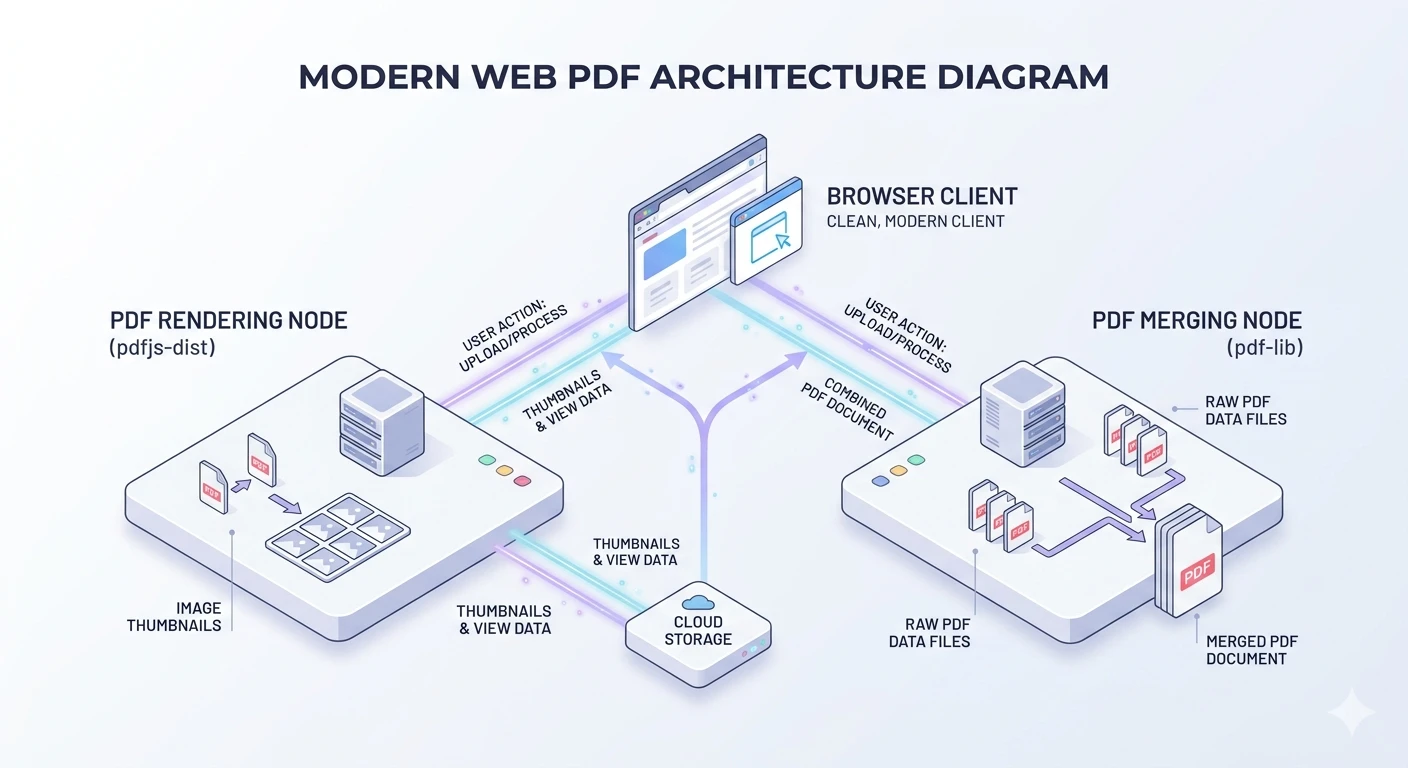
1. Rendering Thumbnails with PDF.js
To provide a great user experience, users need to see thumbnails of the PDFs they upload. pdfjs-dist is perfect for this, but rendering PDFs is CPU-intensive. To prevent the browser UI from freezing, it is crucial to use a Web Worker.
Here is how we render the first page of a PDF file to a JPEG data URL:
import * as pdfjsLib from "pdfjs-dist";

// Point to the worker script
pdfjsLib.GlobalWorkerOptions.workerSrc = `//unpkg.com/pdfjs-dist@${pdfjsLib.version}/build/pdf.worker.min.mjs`;

async function renderPdfThumbnail(file: File): Promise<string | null> {
    const buf = await file.arrayBuffer();
    const pdf = await pdfjsLib.getDocument({ data: buf }).promise;
    const page = await pdf.getPage(1);

    // Render at a comfortable thumbnail scale (e.g., 60%)
    const viewport = page.getViewport({ scale: 0.6 });
    const canvas = document.createElement("canvas");
    canvas.width = viewport.width;
    canvas.height = viewport.height;

    const ctx = canvas.getContext("2d");
    if (!ctx) return null;

    await page.render({ canvasContext: ctx, viewport }).promise;

    // Convert to web-friendly JPEG
    const dataUrl = canvas.toDataURL("image/jpeg", 0.75);
    pdf.destroy();

    return dataUrl;
}
2. Merging PDFs with pdf-lib
The actual merging of the standard PDF files happens when the user clicks the "Merge" button. We use pdf-lib because it elegantly handles copying pages between different PDFDocument instances without corrupting metadata or resources.
The workflow is:
- Create a new, blank
PDFDocument. - Loop through the uploaded files.
- Load each file as a
PDFDocument. - Copy its pages and append them to the new document.
- Save the new document into a
Uint8Array(Blob) and trigger a download.
import { PDFDocument, degrees } from "pdf-lib";

async function mergePdfs(files: { file: File, rotation: number }[]) {
    // 1. Create a new document
    const mergedDoc = await PDFDocument.create();

    for (const pdfFile of files) {
        // 2. Load the source PDF
        const buf = await pdfFile.file.arrayBuffer();
        const srcDoc = await PDFDocument.load(buf, { ignoreEncryption: true });

        // 3. Handle user-applied rotations
        if (pdfFile.rotation !== 0) {
            srcDoc.getPages().forEach((p) => {
                const currentAngle = p.getRotation().angle;
                p.setRotation(degrees((currentAngle + pdfFile.rotation) % 360));
            });
        }

        // 4. Copy all pages from the source to the merged document
        const copiedPages = await mergedDoc.copyPages(srcDoc, srcDoc.getPageIndices());
        copiedPages.forEach((p) => mergedDoc.addPage(p));
    }

    // 5. Save and trigger download
    const mergedBytes = await mergedDoc.save();
    const blob = new Blob([mergedBytes], { type: "application/pdf" });
    const url = URL.createObjectURL(blob);

    // Setup download link...
}
3. Handling Drag, Drop, and Reordering
Creating the capability to drag-and-drop array elements visually in React requires managing the state of the active dragged item. We implemented simple onDragStart, onDragEnter, and onDragEnd event handlers natively.
When an item is dragged over another item, we immediately update the React state array, swapping their positions. This provides instant visual feedback without needing a heavy drag-and-drop library.
Conclusion
By running document processing entirely in the browser, modern web applications can rival desktop software in capability while beating them in accessibility and privacy. Leveraging pdf-lib for structure and pdfjs-dist for rendering provides a robust foundation for building powerful PDF manipulation tools like our PDF Merger.